Dashboard
FY —
Snapshot
Total Spend vs Net Income
Gross Income vs Income Tax
Allowance caps
Upload expense receipt
Scan a photo or PDF — approve the totals before they are saved to expenses.
Recommended best way to scan your receipts
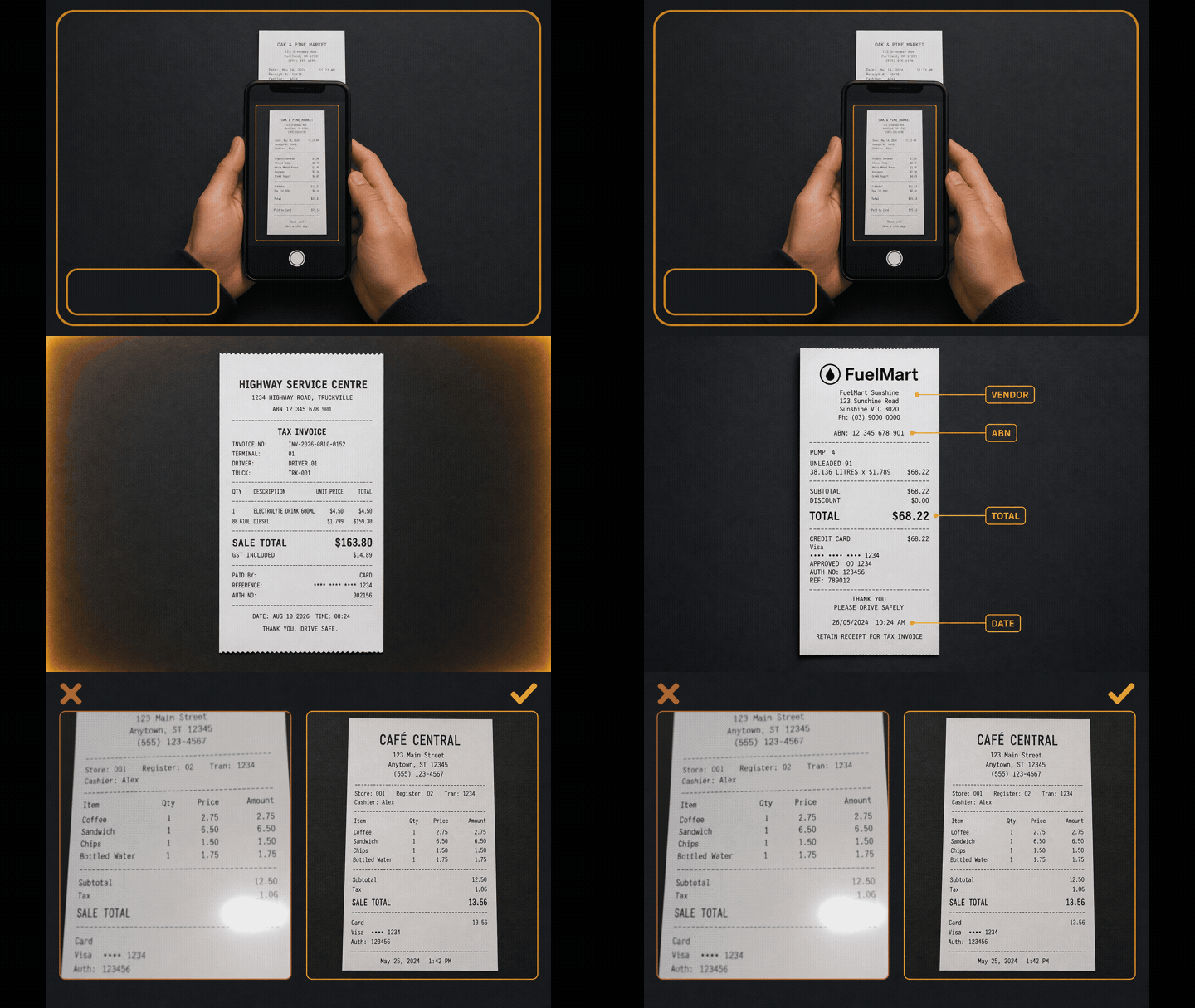
- Whole receipt in frame — try to include the top of the receipt and fit the date in the photo.
- Flat and sharp — dark surface, even light, no finger glare over the total or ABN.
- Scanner needs — vendor name, ABN, SALE TOTAL (or amount due), and the purchase date.
Drag & drop an expense receipt (image or PDF), or use the camera with a live scan frame
The camera is used only to photograph receipts and payslips you choose to save. You can refuse the permission and upload a file instead.
Add expense manually
Enter an expense without a photo, or edit fields filled from a scan. Use the ticks below for cash claims and when you have no receipt.
Import bank statement (CSV)
Export a .csv from your bank (CommBank, NAB, ANZ, Westpac, ING and similar). Review every line before it lands on your ledger — leave personal transfers and non-work spend unticked. This does not lodge with the ATO, and it does not use a monthly scan credit.
Drop a .csv file here, or choose one from your device
Total expenses
Range:
Expense receipt photos
Fixed costs
Recurring expenses post automatically as each due date arrives (Australia/Sydney calendar). Stop a series any time — posted rows stay on the ledger to reconcile.
Expense Ledger
Scan an invoice or payslip
This is the income uploader. Invoices scanned here stay on Income.
Drag & drop an invoice, payslip or distribution (image / PDF), or use the camera
The camera is used only to photograph receipts and payslips you choose to save. You can refuse the permission and upload a file instead.
Add income manually
Import bank statement (CSV)
Pull pays and other credits from a bank .csv into income — or flip a line to expenses if it was money out. Review each row first. This does not lodge with the ATO.
Drop a .csv file here, or choose one from your device
Income Document Photos
Income Ledger
Car Expenses and Claims
ATO D1 work-related car expenses — choose Cents per kilometre or Logbook method, then record trips against your work vehicle.
Work vehicles
Loading…Add or edit a work vehicle
Claim method (ATO D1)
Record a work trip
Core ledger is your trips. Receipt uploads stay optional for your records.
Logbook trip (multi-stop)
Open trip
Running-cost claims (logbook)
Claim actual car costs (fuel, servicing, tyres, rego/insurance, parking/tolls). Deductible portion follows your active vehicle work-use %. Keep written evidence.
Work trips ledger
Car receipt photos
Optional photos for substantiation or logbook running-cost claims.
Car Expenses Ledger
EOFY performance statement
Accountant packs (Pro+)
Taxpayer briefing mapped to individual-return labels for PAYG, sole trader or partnership, a lodgement brief on the EOFY statement, a read-only share link, a BAS/GST worksheet, and a multi-year tax pack for your agent.
Taxpayer briefing for your tax agent
Uses the Profile registration (employee, sole trader or partnership) and maps saved income and deductions to individual-return labels. Includes a still-needed checklist. Not a lodged return.
Accountant share link
Creates a read-only EOFY pack they can open without logging in.
BAS / GST activity statement
ATO-box worksheet (G1, 1A, G11, 1B, 9) you can download and use when lodging on the ATO Business Portal. Not a lodged BAS.
Multi-year tax pack
Financial Forecast
Projected totals
Scenarios
Create your profile / Log in
Save your receipts, income, EOFY figures and presets to your own profile. New here? Choose a username, email and a strong password.
Signed in as
Your data below is private to this profile. Presets pre-fill new entries.
Plan
Loading plan…
Pro is $10/month or $110/year AUD; Pro+ is $18/month or $190/year. Paid plans auto-renew until you cancel. Cancel from this page or Manage billing (Stripe Customer Portal) — you keep access until the paid period ends. Website billing only; this is not an App Store or Play purchase.
For recovery and security reminders.
Password
Change any time — you’ll be reminded after 90 days.
Delete account
Permanently deletes this login, ledgers, receipt files and any website subscription (Stripe is cancelled immediately). Type DELETE and your password. The primary mod account cannot be deleted here.
Presets
Used when adding or approving expenses: work-use % pre-fills the expense forms (and scales deductible totals). Default category is used when a scan cannot detect a stronger category from the business or receipt — known stores (fuel, groceries, meals) still win.
Taxpayer profile
Extra entity (Pro+)
Keep an employee PAYG profile and a side sole trader on this same login. Switch the active entity to file receipts against the right return.
Pro+ unlocks one extra entity.
Partnership seat (Pro+)
Invite the other partner’s existing login so they can open this partnership ledger.
Contact support
Have a question or hit a snag? Send a message and we’ll get back to you. Your request goes to support@gotaxationsuite.com, and you’ll get a confirmation notice on the email you enter below.
Pro+ sends this as priority support.
How each tab works
Tap a topic for a short guide. Use these when you’re getting started or need a refresher.
Disclaimer
This app and its creators do not provide financial advice of any kind. Nothing shown here is intended as tax, financial or legal advice, and the information, estimates and categories do not fully factor your personal financial circumstances, entitlements or obligations. This app is an assistance tool to help you save receipts and file income and expense entries for general convenience. Figures and summaries are indicative only and may be incomplete. It is not a substitute for professional advice. Please seek advice from an accredited tax, financial or legal professional for any such matters.
This is not an official ATO product. The BAS screen is an ATO-box worksheet you can download and copy when you lodge — the app does not lodge a BAS or tax return.
For the most accurate saving of receipts, income and expense entries, use a stable internet or cellular connection while you work. Interrupted uploads or saves can leave incomplete records until you reconnect and try again.